jeudi 31 mars 2011


DIAMOND PROJECT ROM Release V3.3
[WWE|GER|ITA|FRE|ESN|PTG]


Main features:

* Based Diamond 1.93.921.2
* WM6.1 version 5.2.20273 build 20273.1.3.3
* Full OEMAPPS Part updated
* New Driver
* Xip update
* HSDPA enabled
* Video call enabled
* Smart dialing enabled
* Office Mobile 6.1
* Office Zip and Fax viewers
* OneNote Mobile 12.0.4518.1055 [UPDATED]
* .NET Compact Framework 3.5 [NEW]


* List OEM

* Asoft_MMS_5.0.27.25 RC3 [08.08.08]
* BT BPP_1_6_5_0
* BT SAP_3_1_0r
* BT Ftp v1_2_33281_9 [08.08.08]
* Album 2_0_18171722_0 [08.08.08]
* Audio Booster 2_0_18143227_4
* AudioManager 1_5_18171831_0 [08.08.08]
* CAMERA v6_02_31657_00 [08.08.08]
* ConnectionSetup 1_5_34317_1 [08.08.08]
* Endkey_1_1_34078_1 [Mapped to End key] [NEW]
* EnlargeStartMenu_1_2_34318_100 [NEW]
* Ezinput_1_5_31776_0 [Latest Raphael ]
* FM Radio_1_6_1816_4032_2 [NEW] [08.08.08]
* MP3 Trimmer_1_1_18163629_1 [NEW][08.08.08]
* JbedJava v0_0_20080610_2_1
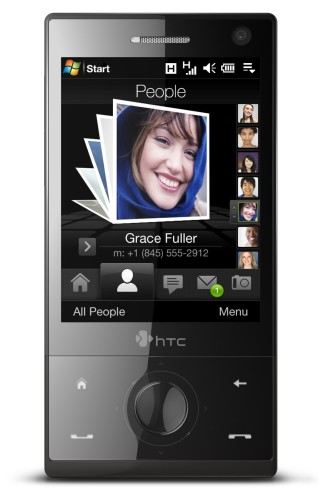
* Manilla_1.2.34591.1_1813.6 [Support multi languages, icons color and more faster]
* PlayShow_1_0_18172431_1 [NEW][08.08.08]
* Quick GPS_1_00_18152630_2 [NEW][08.08.08]
* Random Access_4_0_18172029_0 [NEW][08.08.08]
* Sim Manager_6.53 [NEW][08.08.08]
* Task_Manager_2_1_34589_1 [Latest]
* VoiceRecorder_1_10_18151728_1 [NEW][08.08.08]
* Volume Control_1_2_18174025_0 [NEW][08.08.08]
* YouTube Application_1_0_1817_3525 [NEW][08.08.08]
* XT9_IME_v1_5_31925_0
* VideoTelephony_v2_0_31728_0
* USBToPCPopUp_v2_1_18173225_0


and more...

Some Tweaks update :


* OS only ROM
* Big storage
* Optimized cache
* Bluetooth patch included
* Best Bluetooth A2DP settings
* Bluetooth DUN support
* Icons Space supported
* Edited some graphic in manila and icons apps


Download :

[ WWE | GER | ITA | FRE | ESN | PTG ]

Special Thanks to :


imobile.tw for base 20273
ark666 for translated some files in PTG version and test rom
mkhattab for test rom
tabarda for test rom

mardi 29 mars 2011

new version of manil

I upload new version of manila from raphael (version 1.2.37896.1_1813.6) with new wallpaper and weather citys in english.


BSB ROMS WM6.5 build 28002 for Htc Diamond

Fully tweaked rom: native wm6.5 kernel fully working, unused stuff removed, programs compressed, xip fully tweaked, some personal tweaks, d3d drivers, graphics improvements, many registry changes, gps tweaks, rilphone 1.14, images compressed, custom mortscripts bla bla bla...

Programs added(most of the apps included in the official ROM +):
- RAM Sweeper
- Album with facebook
- Modaco NoData
- Facebook app
- pocket rar
- new google maps
- working youtube version
- PHM Reg editor
- XDA_UC & UC support
- Opera 9.7
- ......... (some more coommon apps)

-----------------------------------------------------------------------------------------

  WM6.5.1 (build 28002)


Free Storage: 95mb
Free RAM: 58mb
Known Bugs:

Code:
  • -
Last Changelog:

Code:
  • Updated to build 28002
  • Changed wallpaper for a correctly resized one (thanks to patacayre)
  • Updated & Fixed Streaming media
  • Updated & Fixed RSS Hub, now you can scroll and that
  • Updated Ezinput to ver 2.1 (this was so damn hard... hope it's worth it)
  • Fixed some ezinput languags
  • Updated Quick GPS
  • Added option to enable keyboard vibration at first boot (thanks to gsmdb)
  • Fixed launched apps from lockscreen (should be like version F- now)
  • Updated MarketPlace
  • Fixed Opera outofmemory problem
  • Removed Power app from the leo to make the backlight work
  • Changed ArcsoftMMs version (again...)
  • Added BubbleBreaker(thanks to Clanger)
  • Removed over 100 unnecessary files
  • Updated Wifi Router

Last version: BsB 6.5.1G: Direct Download
 
WM6.5(build 21867)


Free Storage: 102mb
Free RAM: 62mb


Last Changelog:
Code:
  • too many things
Last version BsB6.5S: Direct Download 
 
 Utilities

- Additional keyboard languages (for ezinput 2.1) ->here<-
- Default dialer background ->here<-
- Auto lock device when backlight off ->here<-
- HTC like dialer skin ->here<-
- HTC Volume control from tachi ->here<-
- Old Notifications (fixed) ->here<-:

Rom Gen.Y PX-D R0 with XDANDROID

Htc Diamond ROM


Bringing you the first all-in-one, dual-boot diamond rom with XDANDROID. This ROM features a very light & optimized Gen.Y WM 6.1 core (which is accesible, more about that below) & the latest version of XDANDROID v2.1 (27.01.2010 at the launch of R0). The WM Core has all the basic stuff included (e.g. gps, bluetooth, phone, sms, alarm, camera).

This is an all-in-one ROM, meaning it already has XDANDROID cooked in, which is installed and configured during the first boot.
The second boot, u get the custom Gen.Y DualBOOT (made by myself), which allows u to boot into windows (to update the android build, testing, etc.) or boot directly into android using haret. (more info below)

I know XDANDROID is not yet perfect, but this is more of a proof-of-concept ROM, showing that it will be possible to replace WM on the Diamond.

Anyway, more info coming soon, i just wanted to make the announcement since the first tests have been succesfull, and booting etc. already works. Will post screenshots very soon..

Screenshots:


Preparation
There are a couple things u MUST do before u flash this ROM:

1) Disable the PIN Code

2)
Originally Posted by TecHunter  View Post Some bugs are yet to be resolved so to make sure you won't have to reboot again, make sure under Windows Mobile you have:
-Enabled the GPRS Connection (it works for me without this step but sometime not)
-disabled the airplane mode (if you activated the GPRS you should't be in this mode ^^
-disable whatever special state you put your phone in.
2) If u already have a copy of XDANDROID on your internal storage, it's strong recommended u delete all these files before flashing

3) U need to have at least ~300-400MB of free space on your Internal Storage before flashing this ROM.

4) And last but not least, Disable the PIN Code, just in case u forget

5) Be advised that the first boot of Android takes a while (~10 minutes), but subsequent boots are alot faster (~2 minutes)

Gen.Y DualBOOT User Guide


* Enabling FastBoot requires AutoBoot to be enabled

Check out this thread, to see what's working / not working & follow the latest developments

Not working (as of 27.10.2010):
  • Camera
  • GPS
  • Bluetooth
  • Opengles hardware acceleration

* U might get an FC (Force Close) on startup concerning the keyboard, just close it and ignore it, keyboard works just fine

Download

Standard version: includes the full XDANDROID package, and XDANDROID is installed automatically to the Internal Storage
Core version: does not include the XDANDROID package, requires XDANDROID to be manually installed to the Internal Storage

Standard version ~118 MB

Core version ~35 MB (for Advanced Users only, must install XDANDROID manually with this one!)

Windows Mobile 6.5 Clean Basic ROM

Windows Mobile 6.5 Rom (Htc Diamond ) ENG

SENSE 2.5

After installing the ROM :
Free main memory : 130.410 MB
Used RAM (At boot up) :56%


The ROM looks like this :


Download

lundi 31 janvier 2011

List of Diamond Tweaks

This is a summary of Diamond tweaks collected from various threads on XDA and from people's contributions. Thanks to all who discovered the Tweaks (not mentioning by name because there's too many to mention and all I did is aggregate). This is a collective effort so let's keep the list growing!

thread. Let's keep the comments in the
Warning: Be sure you know what you're doing and read around the Diamond forums to see where others have run into trouble and with which tweaks on which ROMs. Many people have had to Hard Reset their devices while others have had no problems so read up!

1. Boost TFL3D Performance --> Using Advanced Config, change File system cache to 8mb and file system filter cache to 131072

2. Boost TFL3D Performance --> HKLM\System\Storagemanager\Fatfs and change key Cachesize from 16384 to 32768

3. Wake Up on New SMS --> HKLM\Drivers\BuiltIn\RIL : DisableSMSWakeUpEvent <-- set to "1" by default. Change value to "0"

4. Switch Mute Call on phone flipped face down: HKLM\Software\HTC\PHONE : FaceDownMuteRing: change value to "1" (FIXED: thanks KuKuRiKu and everyone)

5. Change CallWaiting Tone --> HKLM\Software\HTC\PHONE : by default set to \windows\waitingtone.wav by default. change to anything else

6. Boost TFL3D Scrolling Speed --> - HKLM\SYSTEM\GDI\GLYPHCACHE\limit = 16384 or 32768 (DWORD decimal)
- To change it back to the default: - HKLM\SYSTEM\GDI\GLYPHCACHE\limit = 8192 (DWORD decimal)

7. To do a Hard Reset, with the phone ON, hold down the Volume Down and Enter (round navigation) keys and press soft reset while they are pressed

8. Prevent screen switching off during phone call --> HKEY_Local_Machine\Drivers\BuiltIn\RIL\EnableFastD ormantDisplayDuringCall to 0 (Note: does not work on all ROMs)
AND (tested and works on EU ROMs thanks to Rod65)
HKCU\ControlPanel\Phone\Sleep switch value from 1 to 0

9. Downlod original CONTENT folder (Wallpaper, VIDEO, MUSIC) here http://rapidshare.com/files/12127104...orage.rar.html

10. Set HTC Album X button to close not minimize:ok_minimize change value to 0

11. Disable Enlarged Title bar (when you click on a notification) to the default WM behavior: HKLM->Software->HTC->EnlargeTitleBar - and change "Enable" from 1 to 0.

12. Turn off startup aninmation and sound: HKEY_Local_Machine\Software\HTC\HTCAnimation\ -> rename both "StartupGif" and "StartupWav" to other names

13. Enable GPS photo: HKEY_LOCAL_MACHINE\SOFTWARE\HTC\Camera\P10 -> change the value "enabled" from 0 to 1

15. Another supposed TFL3D tweak for better performance: HKLM\Software\OEM\TFLOSettings:
SpeedHigh: default value (25) <-- Change to (5) / SpeedLow : default value (70) <-- Chnge to (14) save and soft reset

16. Adjust screen sensitivity: HKEY_LOCAL_MACHINE\Drivers\TouchPanel
Value = PressureThreshold
Change from the default dword:00000027 or 34 to dword:000000f0 or 240 in decimal

17. Lightsensor Switching the Screen off- realised by yelitterulez, confirmed by pietrucci and tested by myself. When making a call the screen stays on if you leave the phone lying flat on a table. If you wait 10 seconds into the call, you can pick it up to your ear and the screen stays on.

BUT if you make a call with the phone slightly tilted/ slanted (you get the idea), the screen turns off as soon as the call gets connected!
The moment you hold the phone to your head the blacklight turns off. In fact: the moment you hide the screen with anything it turns off! (try your hand...).
This might be the reason why everybody's complaining about the screen turning off during a call: you hold the phone to your head! When you turn the screen back on manually, it stays on no matter if you hold your hand or head...

18. Automatically lock your Diamond --> HKEY_CURRENT_USER\ControlPanel\BackLight\AutoDevic eLockEnable from 0 to 1 and everytime your backlight goes off the device is locked

19. More Camera Modes:
To Enable 'Burst': HKEY_LOCAL_MACHINE\SOFTWARE\HTC\Camera\P6 -> change the value "enabled" from 0 to 1

To Enable 'Sport': HKEY_LOCAL_MACHINE\SOFTWARE\HTC\Camera\P8 -> change the value "enabled" from 0 to 1

To Enable 'Video Share': HKEY_LOCAL_MACHINE\SOFTWARE\HTC\Camera\P9 -> change the value "enabled" from 0 to 1

20. Delay device autolock: HKEY_CURRENT_USER\ControlPanel\BackLight\AutoDevic eLockTimeout -> Change the Dword value (30 = 30 seconds, etc)

21. Enable Manual Screen Rotation (Portrait/Landscape): HKLM - System - GDI - Rotation - HideOrientationUI (change from 1 to 0)

22. Hide SIM Contacts: HKCU\ControlPanel\Phone - create a new DWORD value named "ShowSim" and set it to 0

23. Show Weekday in TFL3D (thanks to pulp) - download and install http://rapidshare.com/files/127174792/weekday.cab

24. Enable HSUPA:
HKLM\Software\HTC\AdvancedNetwork\SupportHSUPA =change it to 1

25. Enable Audio Booster without headset-->HKLM/System/State/Hardware/Headset set the value to 1 (soft reset will bring it back to 0)

26. Add a Call History tab to TF3D (discovered by sushilange, spread by Fabliv) --> http://forum.xda-developers.com/showthread.php?t=410180

27. Add new Cities to TF3D
http://forum.xda-developers.com/showthread.php?t=408918 - thanks to R. DevilR

28. Remove orphan icons and shortcuts
- http://forum.xda-developers.com/show...97&postcount=3

29. Four icons in a row in WM Programs/Settings screens - http://forum.xda-developers.com/show...4&postcount=16

30. Remove Vertical and Horizontal Scrollbars
For the horizontal (bottom) scrollbar:
HKLM\System\GWE\cyHScr = 0 (DWORD decimal)
For the vertical (right) scrollbar:
HKLM\System\GWE\cxVScr = 0 (DWORD decimal)

31. Remap Manila softkeys:
HKLM/Software/HTC/manila/
HomeLSKPath, which is the left softkey (Standard = Phonepad)
And
HomeRSKPath, which is the right softkey.
If you change these with the location of the programs you want to link to, and simultaneous change the names:
HomeLSKText = Left softkey text
And
HomeRSKText = Right softkey text.
HKEY_LOCAL_MACHINE\Software\HTC\HTCAlbum :

32. Change system and context menu font size:
HKEY_LOCAL_MACHINE\system\gwe\menu\popfnt
and change the value for the "Ht" entry to "1000" decimal (from 1200)

33. Increase maximum picture size when shooting in Burst and Sports mode:
When activating "burst" and "sport" the max size of the pictures is "L" but if you change:
HKLM\SOFTWARE\HTC\Camera\P8\MainCamCaptSize value to 1024
and
HKLM\SOFTWARE\HTC\Camera\P8\MainCamSupportCaptSize to 1744Do the same for P6 and you can now shoot in these modes up to 3M and not just L - thanks to nnevynn for

34. Get Blackberry Connect working on your Diamond!! (thanks to cybertech99)
http://rapidshare.com/files/114522380/BBConnect_WM6_Profession.cab

35. Disable Diamond Phonepad Skin
HKLM -> Security -> Phone -> Skin -> Enable (set 1 to 0), then reset.

36. Enable Better Power Management
HKLM\Drivers\SDCARD\ClientDrivers\Class\SIM_Class
Set DisablePowerManagement = 0 (default=1)

HKLM\Drivers\SDCARD\ClientDrivers\Class\MMC_Class
Set DisablePowerManagement = 0 (default=1)

HKLM\Drivers\SDCARD\ClientDrivers\Class\NAND_Class
Set DisablePowerManagement = 0 (default=1)